Pages

Tuesday, July 1, 2025

Why Avada Theme Is Still My #1 Choice After Building 10+ WordPress Sites


When you’re building WordPress sites for clients, your tools have to work — fast, reliably, and flexibly.
I’ve used dozens of themes over the years, but one stands out among all: Avada.

Whether it’s a blog, corporate website, portfolio, or eCommerce — Avada has consistently delivered, both in design freedom and speed.
In this post, I’ll share my hands-on experience using Avada on over 10+ websites, and why I still recommend it to my clients in 2025.

💡 What is Avada?

Avada is a best-selling multipurpose WordPress theme available on ThemeForest, with 950,000+ sales and counting.

It’s packed with:

✅ Drag & drop Fusion Builder (now Avada Builder)
✅ 90+ pre-built websites for one-click import
✅ Fully responsive design
✅ WooCommerce integration
✅ Advanced customization (without code)

🛠️ Why I Keep Using Avada on Client Projects

After building 10+ websites using Avada, here’s what I love most:

1️⃣ Super Flexible Design System
Avada’s live builder lets me build anything — from scratch or from templates — without touching code. Clients get exactly what they want, fast.

2️⃣ Speed + SEO Ready
With proper setup, Avada performs better than many “lightweight” themes. It also offers built-in SEO controls.

3️⃣ No Extra Plugins Needed
Many themes need you to install 5–6 plugins just to work.
Avada has built-in forms, sliders, headers, footers, popups — everything.

4️⃣ Top-Class Documentation & Support
Their documentation is a lifesaver.
And whenever I hit an issue, the support team responds fast and professionally.

⚙️ Real Sites I’ve Built With Avada:

✅ Agency portfolio with animated sliders
✅ NGO website with donation system
✅ Educational blog with custom post types
✅ E-commerce store with product filters

“Clients are happy, load time is fast, and I rarely face design limitations.”

🧩 Avada vs Other Popular Themes
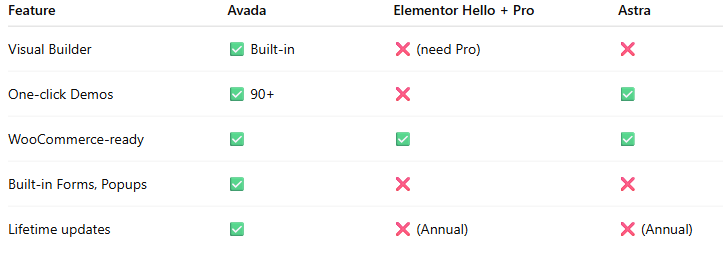
💰 Is Avada Worth the Price?

Yes.
For a one-time cost of $69, you get:

✅ Lifetime updates
✅ Unlimited design freedom
✅ No need to buy extra builders
✅ Faster delivery to clients

I’ve reused this same license structure across multiple unique domains (with separate licenses) and always felt it paid off within the first project.

🔚 Final Thoughts

If you’re a freelancer, agency, or developer looking for a theme that just works, Avada is a no-brainer.
Clients love it.
You save hours.
Sites look clean, professional, and mobile-ready.

I’ve tested many themes — but Avada is the one I still trust to deliver under deadline.

🔗 Ready to Try Avada?

You can get it directly from ThemeForest and start building beautiful sites today.

👉 Click here to check out Avada Theme on ThemeForest

This is an affiliate link. I may earn a small commission if you purchase — at no extra cost to you.

Why I Keep Coming Back to the Flatsome Theme for Client Projects


As a freelance WordPress developer, I’ve worked on a variety of client websites — from news portals to eCommerce stores.

And despite trying dozens of themes over the years, one theme keeps standing out over and over again: Flatsome.

It’s fast, flexible, WooCommerce-ready, and surprisingly easy for clients to manage after handover.
I’ve used Flatsome on several projects, including:

All of them have been live, functional, and profitable — and Flatsome played a big role.

Why I Chose Flatsome (Again and Again)

Easy for Clients to Use

After handover, most of my clients want to be able to update banners, product images, and homepage layouts themselves.
With Flatsome’s UX Builder, they don’t need to call me for every change. Drag and drop works well, and the live preview helps a lot.

Fast Page Load Speed

I’ve tested many themes that look great but slow down when product count increases.
Flatsome remains lightweight and performs well even with 100+ products — especially when paired with proper caching and a decent host.

Built for WooCommerce

This isn’t a general-purpose theme with WooCommerce support added later.
Flatsome is built specifically for WooCommerce, so product pages, carts, checkouts, and filters all work beautifully out of the box.

Tons of Customization Without Coding

Yes, I can write code. But not every project has the budget or scope for full customization.
With Flatsome, I can create completely different looks for different clients — without touching PHP or writing custom CSS every time.

Real Example: PenguinMartBD

A few weeks ago, I completed the design and setup for PenguinMartBD.com, a local online store.
Client wanted something clean, modern, and mobile-optimized — with the ability to run flash deals and promo banners.

With Flatsome, I was able to:

  • Launch a full-featured store within a week
  • Set up mobile-first navigation
  • Integrate custom product categories and sliders
  • Configure coupon-ready checkout

Most importantly, the client was happy.
They’re now uploading new products and handling orders themselves — without needing technical help every day.

The Downside?

Honestly, not much.
If you’re looking for a hyper-minimal blog layout or a headless setup — Flatsome isn’t it.
But for anyone building a modern, responsive WooCommerce store, it’s an excellent choice.

And if your site needs to go live quickly, without compromising design quality or loading speed — Flatsome delivers.

Want to Use Flatsome for Your Site?

You can grab it directly from ThemeForest. It’s a one-time purchase, and you can use it on a site forever.

👉 Get Flatsome Theme from ThemeForest

Need Help Setting It Up?

If you’re not sure how to install, configure, or customize the theme for your store — I can help.
I’ve set up over 100 WordPress websites, and Flatsome is one of my favorites to work with.

👉 Check out my Fiverr gig here

I offer full WordPress setup, theme customization, and speed optimization — affordable and on time.

Final Thoughts

Good tools make your job easier.
Great tools make your clients happier.

For me, Flatsome is one of those great tools. It saves time, delivers results, and scales with the client’s needs.
I’ve used it across industries — from retail to publishing — and it has never disappointed.

Monday, February 9, 2015

ComboMag

ComboMag Magazine Template
ComboMag is a magazine-inspired free WordPress Theme perfect for building tasteful online magazine. This website template offers an array of color options for your website header, navigation, sidebar and footer. Moreover, it offers great font options that you can take advantage in creating a unique website design. This free theme also comes with built-in social sharing buttons you can use in promoting your website or getting the word out to your target audience. Most importantly, this theme is full responsive and mobile-friendly.
MORE INFO / DOWNLOAD DEMO
প্যারাডক্সিক্যাল সাইজ ২ বইটি কিনুন à¦•্লিক করুন